6 Wanderlog Alternatives Worth Trying in 2026
Wanderlog is a fine trip planner — but ads on the free tier, a manual-first builder, and no dark mode send plenty of travelers looking. Here are six alternatives, what each does better, and who should pick which.

Let's start with the obvious: Wanderlog is good. It has earned its spot as the default answer to "what should I use to plan my trip?" — solid maps, real collaboration, the best reservation-email parsing in the business, and mature offline apps. If it's working for you, you don't need this article.
But people search for Wanderlog alternatives for consistent reasons, and they're fair ones: the free tier shows ads, the AI is a suggestions sidebar rather than the engine, route optimization and other niceties sit behind the Pro paywall, there's no dark mode, and the planning itself is fundamentally manual — you assemble the trip block by block. Depending on which of those sent you here, a different alternative fits. One disclosure up front: the first entry is ours.
1. ChicTravel — for plan-it-together trips with an AI copilot
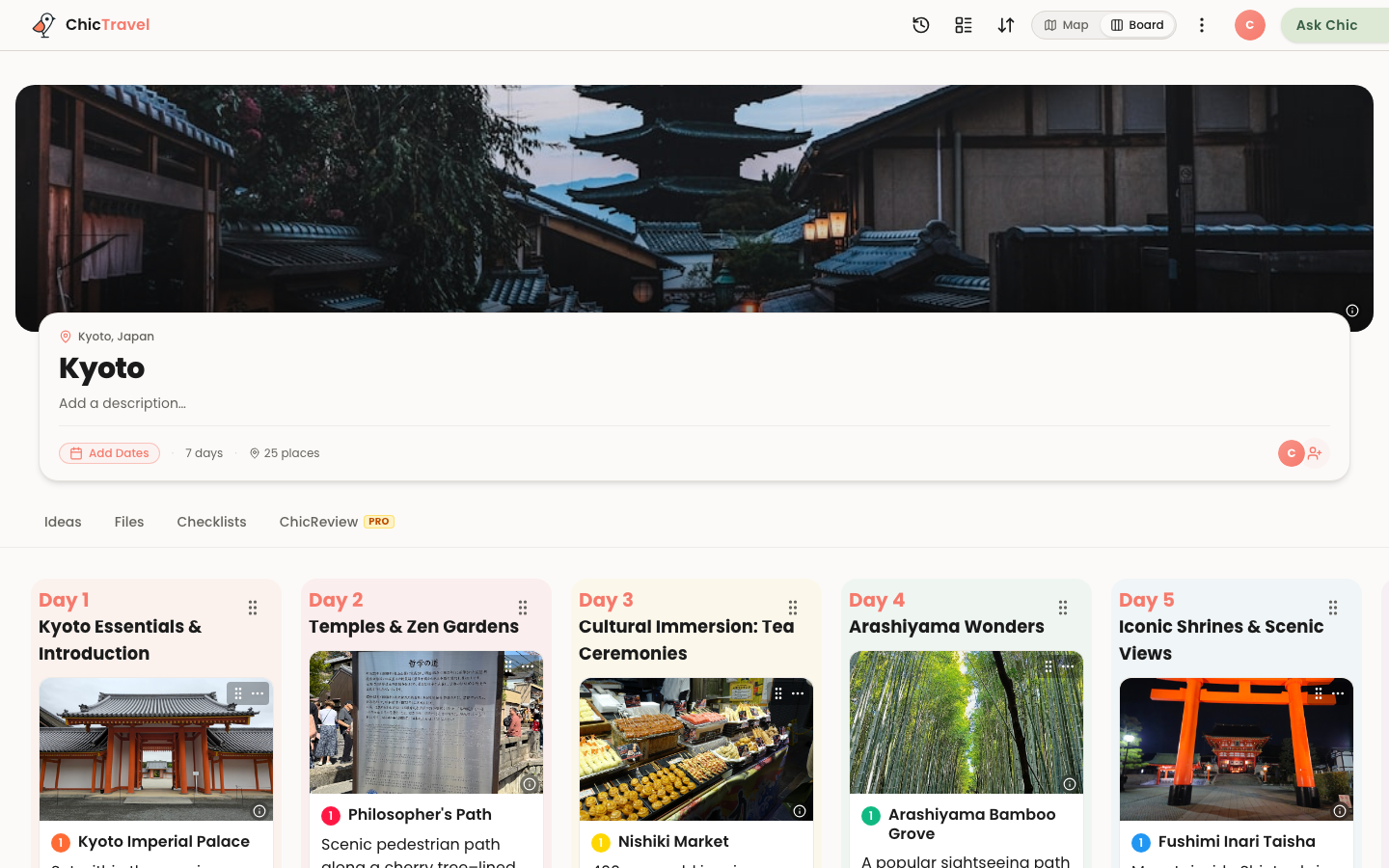
ChicTravel is built around the part Wanderlog treats as a feature: the planning itself. One itinerary your whole group edits in real time, every stop pinned on a live map with routes between stops, days you reshape by dragging — and Chic, the built-in copilot, doing the drudge work alongside you. Describe the trip and it drafts a day-by-day starting point with real places; you and your group stay the editors. Planning feels like working a shared map together, not data entry.
It also does two things no other planner on this list offers: you can publish a finished trip as a guide other travelers can copy in one tap, and you can connect it to Claude over MCP and plan trips from a normal AI chat, with edits landing live in the app. The free tier has no ads and covers all of that. The honest trade-offs versus Wanderlog: no email-forwarding import for reservations (you add flights and hotels in-app), and no offline-first native app yet.
See the collaborative AI trip planner →2. TripIt — for keeping reservations straight
TripIt is the veteran of travel apps and still the best at exactly one job: forward every confirmation email to it and it builds a chronological master itinerary of flights, hotels, cars, and restaurants. For frequent flyers whose "planning" is mostly logistics, it's nearly frictionless, and the Pro tier's real-time flight alerts are genuinely useful.
What it isn't is a planner. There's no meaningful map view of your days, no AI, no collaborative editing, and no concept of "what should we do on Tuesday afternoon." If you left Wanderlog because you wanted less manual work on bookings, TripIt is your answer; if you left wanting better day-by-day planning, keep reading.
3. Mindtrip — for AI-native inspiration
Mindtrip is the most polished of the AI-first newcomers: a chat-driven planner with gorgeous place cards, photos, and maps woven into the conversation. For the dreaming phase — "where should we go in October?" — it's the nicest-feeling tool on this list, and a real upgrade over Wanderlog's manual browsing if AI suggestions are what you came for.
It's weaker once the trip turns real: group editing is shallow compared to a true shared itinerary, and logistics like budgets and reservations are not its focus. Many travelers use it to decide and shortlist, then build the actual plan elsewhere.
4. Polarsteps — for the trip itself (and the memories)
Polarsteps comes at travel from the opposite direction: it's strongest during and after the trip, automatically tracking your route and turning it into a beautiful travel journal, with a planner bolted on more recently. The planning tools are simpler than Wanderlog's, but the on-the-road experience — offline maps, automatic tracking, the printed travel book at the end — has no real rival here.
Pick it if your frustration with Wanderlog was that all the effort lives before the trip and nothing celebrates the trip itself. Skip it if you need serious itinerary surgery or group planning.
5. Google My Maps + Sheets — for the free DIY purist
The zero-dollar, zero-lock-in option. A custom Google My Map holds your pins in colored layers (one per day), a shared Sheet holds the schedule and budget, and Google Docs holds the research. Everything is collaborative because Google is collaborative, it's all genuinely free, and it will never sunset a feature you rely on.
The cost is glue work: nothing connects the map to the schedule, there's no AI, no routing between stops, no sense of "day three is overstuffed." It's the spreadsheet-brain answer, and for some groups that's exactly right — it's also what most of us used before trip planners existed, which is why trip planners exist.
6. Notion (or any doc tool) — for trips that are mostly research
If your trips begin as twelve browser tabs and a long list of restaurant recommendations, a Notion workspace — or the equivalent in your doc tool of choice — may serve you better than any structured planner. Databases for places, a kanban for "maybe / booked / done," embedded maps, and total freedom in how it's organized. There are hundreds of free travel templates to start from.
The trade-off is the same as My Maps but steeper: every piece of structure is yours to build and maintain, and on the road a sprawling workspace is much harder to use one-handed on a phone than a purpose-built itinerary. Great for planners who enjoy the planning more than the trip. You know who you are.
So which alternative should you pick?
Map your complaint to the tool. Wanted planning that feels like a shared map your group edits live, with a copilot doing the drafting? ChicTravel. Buried in confirmation emails? TripIt. Still deciding where to go? Mindtrip. Care most about the journey and the journal? Polarsteps. Allergic to lock-in? My Maps and a spreadsheet. Love systems? Notion.
And if you're weighing the head-to-head specifically, we wrote up a round-by-round comparison of ChicTravel and Wanderlog — including the rounds Wanderlog wins — so you can see exactly where each one is strong before you commit either way.
Read ChicTravel vs. Wanderlog, round by round →