

How to Plan a Trip with AI (Step by Step)
AI can draft a genuinely good itinerary in under a minute — if you brief it well, check its geography, and give the plan somewhere to live. Here's the exact process we use, step by step, with the prompts that work.
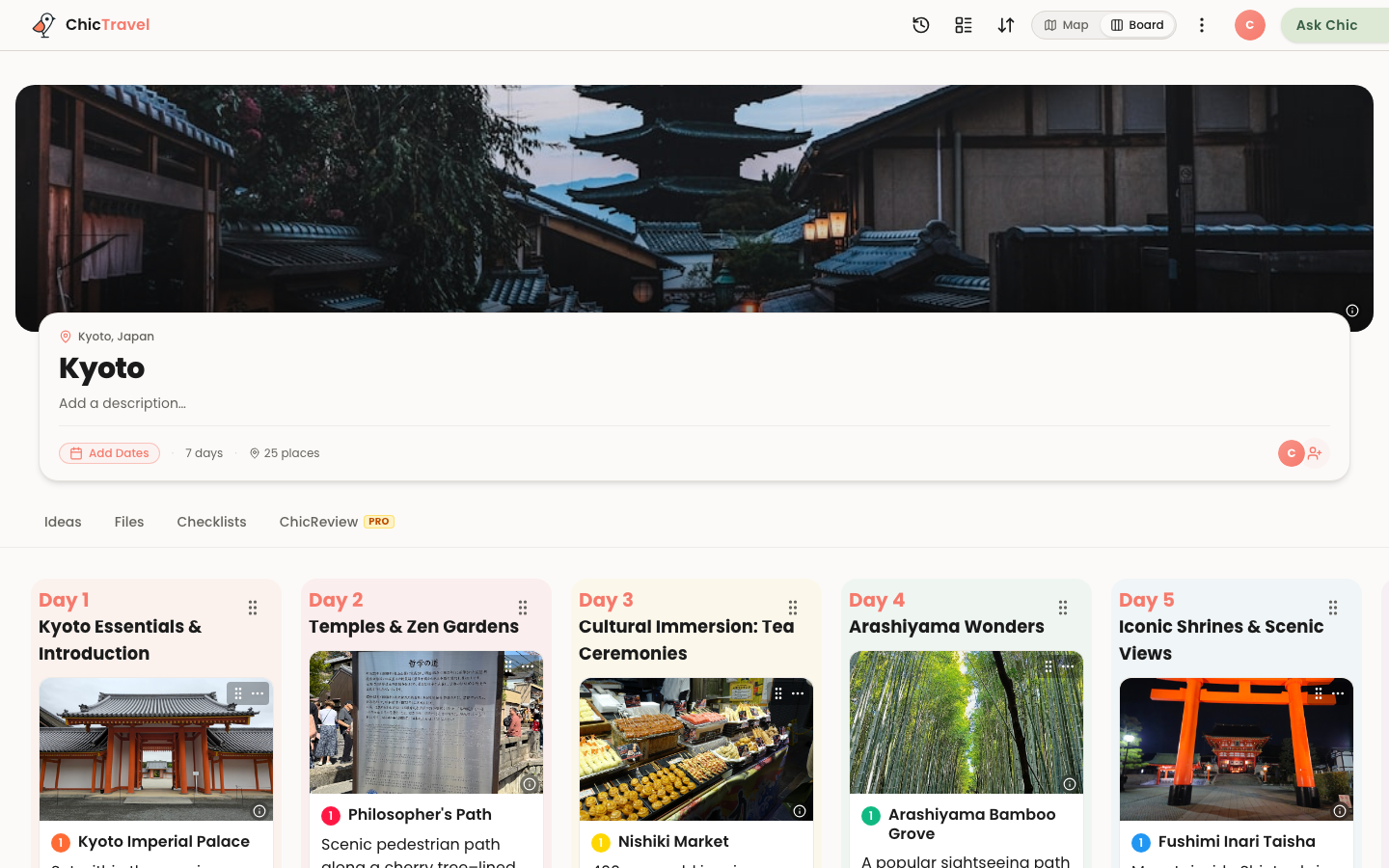
Two years ago, "plan my trip with AI" produced generic top-ten lists with the occasional restaurant that had closed in 2019. That era is over. Briefed properly, today's AI drafts itineraries that would take you an evening of research to match — real places, sensible pacing, local logic like "do the shrine at dawn before the crowds."
But "briefed properly" is doing a lot of work in that sentence, and so is what happens after the draft. AI planning goes wrong in predictable places: vague prompts, unchecked geography, and plans that die in a chat transcript. This is the step-by-step process we use — it works whether your AI of choice is a chatbot or a purpose-built planner like ours.
Step 1: Pick where the plan will live
Decide this before you type a single prompt, because it shapes everything downstream. A plain chatbot (ChatGPT, Claude, Gemini) gives you the smartest conversation and a wall of text at the end — fine if you enjoy transferring plans into something structured. An AI trip planner gives the same kind of draft a home: a map, editable days, and a link your travel companions can open.
Our biased-but-honest take: use a planner if anyone besides you needs to see or touch the plan, and a chatbot only for solo trips or pure brainstorming. The single biggest failure mode in AI trip planning isn't bad suggestions — it's a good plan trapped somewhere nobody can use it.
Step 2: Write a brief, not a wish
"Plan me a week in Japan" gets you the median Japan trip of the internet. The quality of the draft is set almost entirely by the constraints you load into the first message. The formula that works: destination and dates, who's going, pace, food rules, budget, and one or two hard preferences.
Compare: "Plan 5 days in Kyoto in late November for two adults. Slow mornings — nothing before 9am except one sunrise outing you think is worth it. Mostly food and temples, one day trip, dinners under $40 a head, and we're staying near Kyoto Station." Every clause in that prompt removes a whole category of wrong answers. Front-load your constraints; fixing them day by day afterward takes five times longer.
Step 3: Generate the draft — and treat it as a draft
Let the AI produce the full day-by-day plan before you start arguing with it. You're evaluating the skeleton, not the details: are the days themed sensibly, is the pacing humane, did it respect your constraints? A good draft gets the shape right and a third of the specifics wrong, and that's a fine starting point.
One prompt that consistently improves results: ask "what did you have to guess about?" The AI will surface its assumptions — season, mobility, how touristy you want things — and correcting two of those does more than ten piecemeal edits.
Step 4: Check the geography on a map
This is the step that separates plans that work from plans that look like they work. AI knows what's good; it's mediocre at knowing what's near. Every AI itinerary we've ever generated had at least one day that zig-zagged across a city, or a "quick stop" that was forty minutes from everything else on the list.
If your AI plan is text, paste the places into a map before you trust a single day of it. If you're using a planner that pins every stop and draws the routes between them as it generates — this is, frankly, the main reason ChicTravel works the way it does — the zig-zag is visible the moment it exists, and fixing it is a drag, not a re-prompt.
See your AI draft on a live map →Step 5: Edit like an editor, not an author
Now iterate — but stay in charge of taste. The AI is your fast research assistant, not the decision-maker. Effective edit prompts are specific and targeted: "day 2 is overstuffed, move one thing to day 4," "swap the second museum for something outdoors," "give me three dinner alternatives near that night's hotel."
Also: verify the three or four things that would actually wreck a day. Opening hours, closure days (museums love Mondays), and whether that famous place needs a booking two weeks out. AI is much better than it was, but it still occasionally serves you a restaurant that closed, with total confidence. Two minutes of checking beats one ruined afternoon.
Step 6: Bring in the other travelers
Share the plan while it's still warm — this is where trips either become group projects or one person's unpaid job. In a collaborative planner, that means inviting your companions to edit: everyone drags, comments, and adds their non-negotiables directly, and the AI can keep drafting around the changes. In chatbot-land it means pasting the latest version into the group chat every time it changes, which is exactly as durable as it sounds.
A practical tip either way: give each traveler one veto and one must-do, and feed those back into the plan explicitly. It surfaces conflicts in the planning phase, where they're cheap, instead of on a street corner on day three.
Step 7: Attach the real-world logistics
A plan becomes a trip when the bookings attach to it. Get your flights, hotel, and timed reservations into the same place as the itinerary — with times — so day one knows you land at 3:40pm and day four knows dinner is booked for 8. This is also when a budget line is worth adding: AI drafts skew aspirational, and seeing the running total prompts the right arguments early.
If you plan by talking to Claude, this whole loop — flights, hotels, budgets, the lot — can happen in the chat itself: connect ChicTravel as an MCP connector and "add my KIX arrival, 3:40pm on the 24th" lands on the actual itinerary, not in a transcript.
Plan trips by talking to Claude →Step 8: Keep it alive on the road
The plan you leave home with is not the trip you'll take, and that's fine — the point of a structured plan is cheap mid-trip changes. A rainy Tuesday means asking for indoor swaps near your hotel, not re-planning the day from scratch. Keep the itinerary on your phone, keep the map one tap away, and treat the AI as your on-call concierge for the inevitable "we're exhausted, what's good near here?"
That's the whole method: brief hard, check the map, share early, book into the plan, stay flexible. The AI does the hours of research; the judgment — and the trip — stays yours.

